
Radios
Radios create an on/off boolean switch that can be built into array.
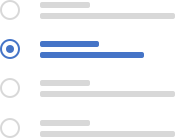
Default Radio
The Default Radio description from Figma goes here
1<div class="w-full">
2    <input class="radio radio-check" type="radio" value="" id="flexCheckDefault" >
3    <label class="radio-label" for="flexCheckDefault"> Radio Label </label>
4  </div>
5  <div class="w-full">
6    <input class="radio radio-check" type="radio" value="" id="flexCheckDefault" checked >
7    <label class="radio-label" for="flexCheckDefault"> Radio Label </label>
8  </div>
Disabled Radio
The Disabled Radio description from Figma goes here
1<input class="radio radio-check" type="radio" value="" id="flexCheckDefault" disabled >
2<label class="radio-label" for="flexCheckDefault" checked>
3    Radio Label
4</label>
5<input class="radio radio-check" type="radio" value="" id="flexCheckDefault" checked disabled >
6<label class="radio-label" for="flexCheckDefault" checked>
7    Radio Label
8</label>
Accessibility
Make it clear what this radio widget does for the user.
-
What to do with radio
-
What not to do with radio
Classes
Complete list of all CSS classes for the component.
| Name | Class |
|---|---|
| Default Radio | radio radio-default |
| Disabled Radio | radio radio-disabled |